The assessor sees your estate for one day. Assure scores every device against the five controls every night, holds every exposure to the 14-day clock, reports the configuration changes that would fail you the next morning, and keeps the evidence so the assessment is a formality rather than a discovery.
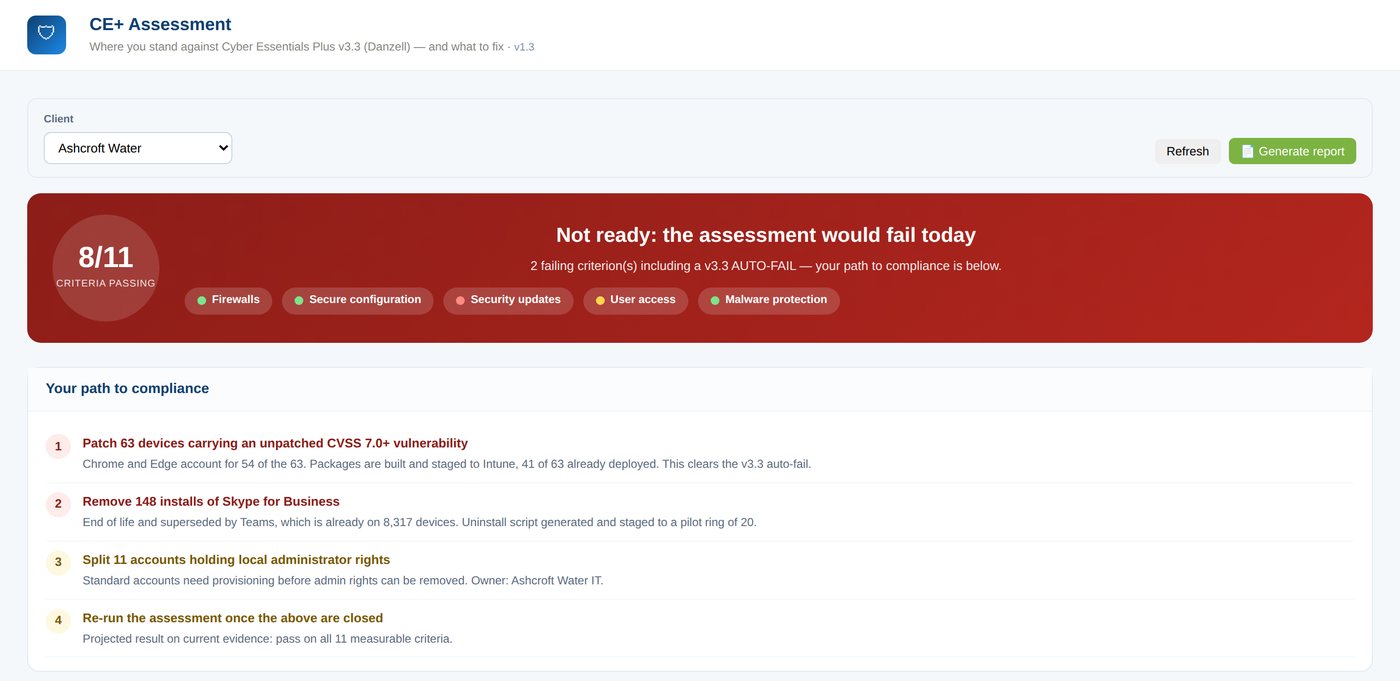
The assessment page reads top to bottom the way an assessor would. A pass or fail position against the eleven measurable criteria of Cyber Essentials Plus v3.3, the failing criteria named, a path to compliance in the order that gets you there fastest, the devices that fail and exactly why, each control with its evidence, and the device sample the assessor will draw from, grouped by OS build.
It is the same data the rest of Assure runs on. When Security Patches closes an exposure or Packaging deploys the fix, the assessment moves the same night. Nothing is re-keyed and nothing is a screenshot from last quarter.
Cyber Essentials Plus tests five things: firewalls, secure configuration, security updates, user access control and malware protection. Four of them are configuration state, and all five change every week in a real estate. A firewall profile is switched off during troubleshooting. An installer adds a Defender exclusion. A contractor is added to local Administrators. A vendor tool disables the Windows Update service and the device looks fine for twelve days.
Each of those is a failure on the day it happens. Without monitoring it is found at the next assessment, by an incident, or by an attacker. Assure finds it the next morning, tells you whether it matters, and gives you the fix.
Each control is scored from what the agent, Intune, Configuration Manager and Microsoft Graph report, and each carries its evidence line. Ticks are pass or fail checks; dots are configuration facts watched daily for change.
Assessor-day tests (the email and browser malware tests and the authenticated vulnerability scan) are performed by the assessor. Assure shows them as such, and makes sure the sample devices are ready for them.
Click any screen to see it full size. All of them show the same demo estate on the same morning, so the numbers agree with each other.
The banner says whether you would pass today and which criteria are failing. Underneath, the path to compliance puts the work in the order that clears the most risk soonest: patch the 63 devices carrying the KEV-listed flaw (packages already built and staged), remove the 148 end-of-life installs, split the 11 shared administrator accounts, then re-run.
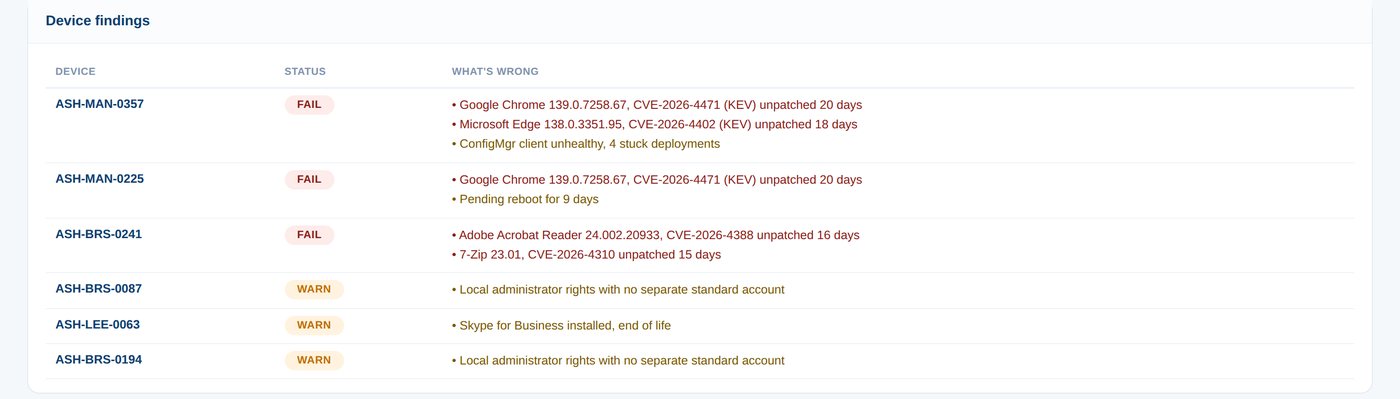
Not a score. The device, the status and the reason in plain words: the CVE, the days unpatched, the KEV flag, the pending reboot, the shared administrator account. Every line is something an engineer can act on the same day and an assessor would recognise.
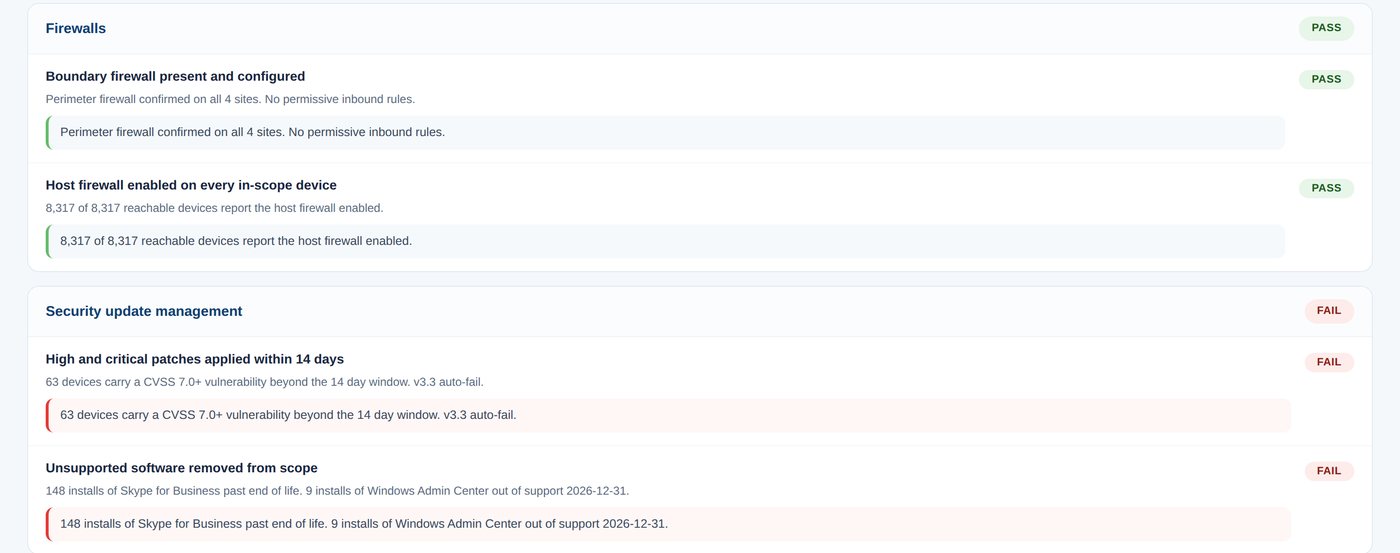
Each criterion carries its evidence sentence, generated from the data rather than typed: "8,317 of 8,317 reachable devices report the host firewall enabled" is a fact the assessor can check, and so is "63 devices carry a CVSS 7.0+ vulnerability beyond the 14-day window".
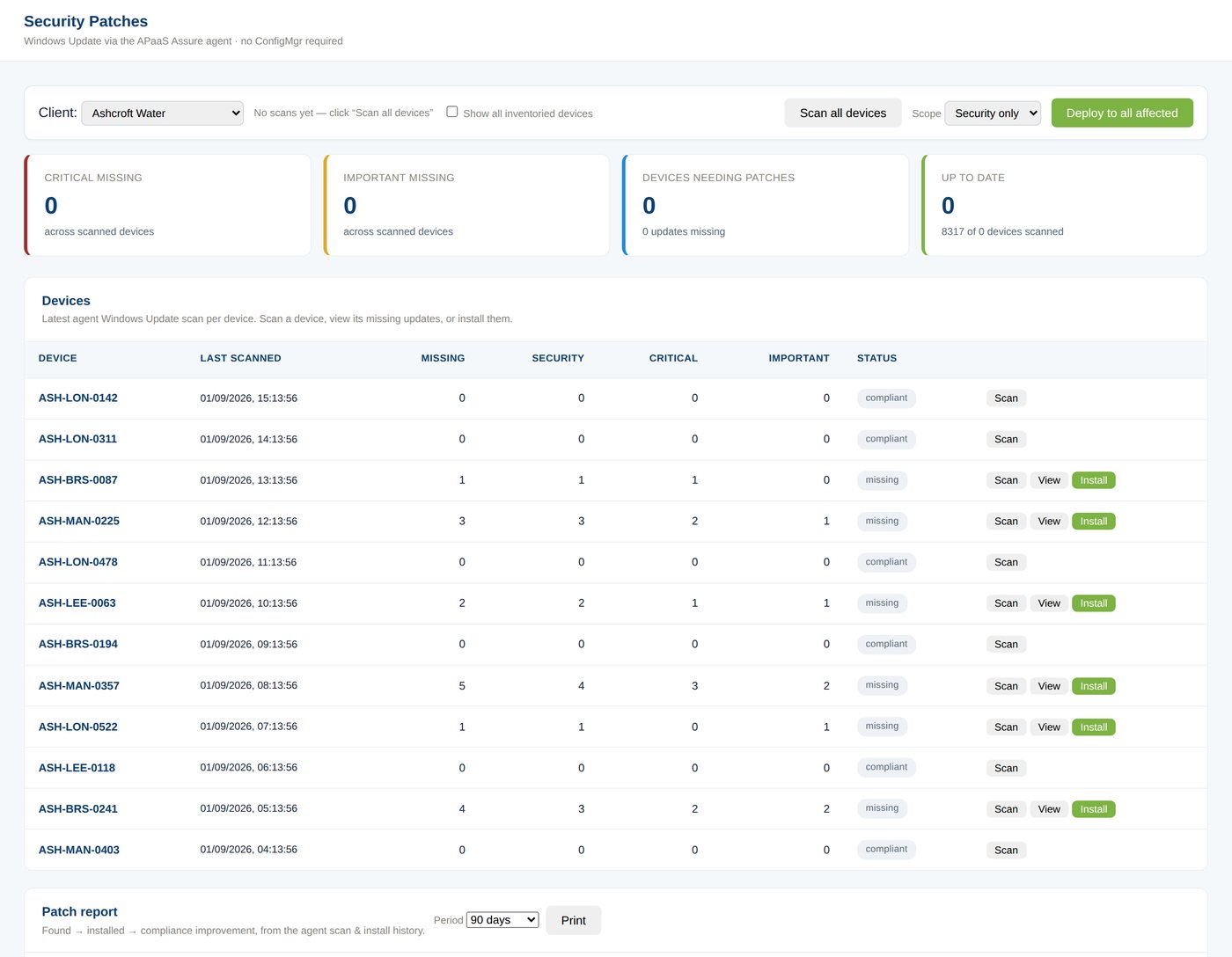
Missing Windows updates and application patches from the agent, matched to NVD and CISA KEV, each with the days remaining before the criterion fails. The fix is a package built to your standards and staged to Intune or Configuration Manager from the same screen.
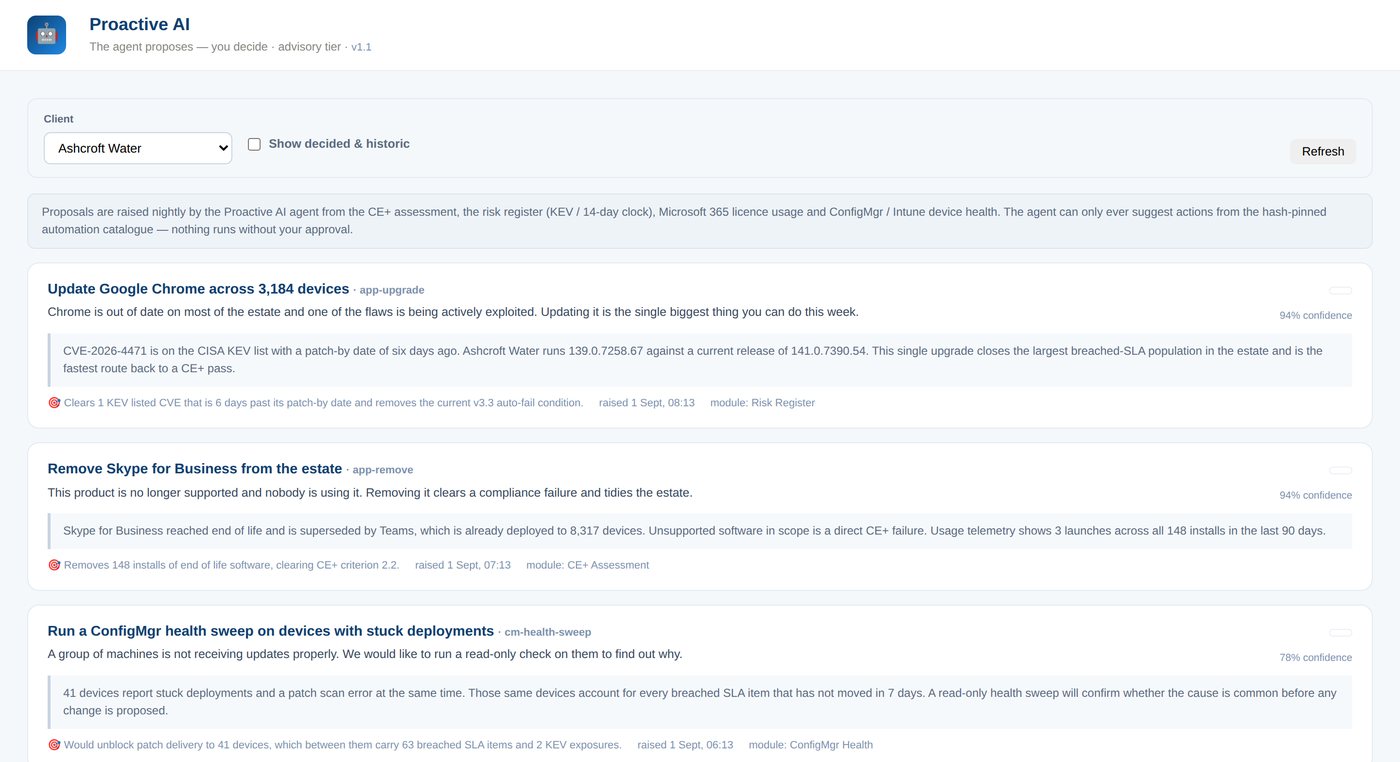
Every night the agent reads the assessment, the risk register and device health, and proposes the handful of actions that would move the score most, with its reasoning written out: what it saw, why it matters, what changes if you approve. Nothing runs without a person clicking approve, and only catalogue actions can run at all.
Cyber Essentials Plus samples devices per OS build. Assure groups your estate the same way, shows the suggested sample size for each group and the devices in it, and flags any device in a group that has not reported its checks. No surprises on the day.

Every morning at 06:30 the agent reads 48 configuration facts on each device, every one of them mapped to a Cyber Essentials Plus criterion, and compares them with the day before. A change that moves a device out of the standard is raised. A change that fixes something is recorded quietly. A change that does neither is noted and nothing more.
The list is short on purpose. Forty-eight facts, not tens of thousands of registry values, which is why the alerts are readable: not "registry value changed" but "tamper protection was turned off on LON-0142, which fails criterion 3.1".
| Device | Change | Severity |
|---|---|---|
| ASH-LON-0142 | Local Administrators membership changed Added: ASH\contractor | Critical |
| ASH-MAN-0225 | Windows Update service start type changed and no longer meets the standard Automatic to Disabled · deadline 19 Sep | Critical |
| ASH-BRS-0087 | Defender path exclusions changed Added: C:\Program Files\LegacyLOB\ | High |
| ASH-LEE-0063 | Remote Desktop changed and no longer meets the standard Disabled to Enabled | Medium |
| ASH-BRS-0241 | Real-time protection is back within the standard Off to On · resolved | Info |
Illustrative feed. The console page is in preview with pilot clients; the engine, the daily digest and the findings are part of the module.
The assessment is a review of a record you already hold. Everything below is generated from the platform's own data, dated, and exportable.
One click from the assessment page. Position, failing criteria, path to compliance, device findings and the sample, as a dated PDF for the board or the certification body.
The sentence under each control, regenerated nightly from the data, with the counts behind it. What the assessor asks you to prove is already written down.
Found, installed and percentage improvement per device and per update, with the date each exposure closed against its 14-day clock.
For any device, what changed and when, what it was before, and who acknowledged it. The answer to "what changed?" without archaeology.
Every rationalisation, governance and remediation decision with the person, the time and the reason. Proactive AI proposals with their approval or rejection.
Month by month: firewall changes, application upgrades and CVEs cleared, so the improvement is visible as a line, not a claim.
Intune, Configuration Manager and the APaaS Assure agent. Outbound only over HTTPS. Nothing opened inbound. Read-only Microsoft Graph for MFA and licence state.
Every device scored against the five controls. The first position is usually uncomfortable and always useful: it is what the assessor would have found.
NIST NVD and CISA KEV matched to what is actually installed. The 14-day clock starts on publication, not on discovery.
Forty-eight configuration facts per device compared with yesterday. Regressions raised, fixes recorded, noise kept out by design.
Packages to your standards, Proactive AI proposals you approve, Workplace Automation for the rest. Every action on the audit trail, every control with its evidence.
See it work
Recorded in the console against the demo estate. No slides.
Almost nothing new, because the module runs through the agent and connections the rest of Assure already uses.
| Requirement | What it means | Needed? |
|---|---|---|
| APaaS Assure agent | Runs as SYSTEM on each device, deployed through your existing Intune or Configuration Manager. Collects inventory, patch state, protection state and the daily configuration snapshot. Read-only unless you approve an action. | Required |
| Outbound HTTPS on 443 | The agent calls the platform. Nothing is opened inbound on your network. Signed requests, UK-hosted endpoint. | Required, usually already allowed |
| Intune or Configuration Manager | For deployment of the fixes and for device and compliance data. Either or both; co-management is understood. | One of them |
| Microsoft Graph, read-only | Conditional Access and MFA state, Microsoft 365 licence usage. Reuses your Intune connection. | For the MFA criterion |
| Your standards | Packaging conventions, approved exceptions (the Defender exclusion a line-of-business application genuinely needs), and any folders or services to watch beyond the defaults. | Agreed during onboarding |
"The assessor asked for evidence on the 14-day rule and we opened the page. He read it, checked two devices from the sample, and moved on. That used to be the afternoon."Head of IT · UK infrastructure consultancy · illustrative quote pending customer approval
No. Cyber Essentials Plus is awarded by a certification body after an assessment. Assure is how you know you would pass before they arrive, how you get there, and how you stay there between assessments. The assessor still assesses; they just find what you already know.
Cyber Essentials v3.3 (the Danzell question set), including the 14-day auto-fail for CVSS 7.0 and above. When the scheme changes, the criteria and the evidence lines change with it.
Not on its own. Detection is read-only. Fixes run only when a person approves them, only from the catalogue of actions APaaS has written and pinned by hash, and every one is recorded. Configuration drift monitoring is entirely read-only.
Deliberately quiet. Only 48 facts are watched, each mapped to a criterion, changes toward compliance are recorded rather than alerted, and lists are compared by membership. The target after a two-week tuning period is two to four recorded changes per device per month, and only the ones that reduce compliance become findings.
Yes. Every read and every action is scoped to the clients a user is entitled to see, per client. The Executive Overview rolls the position up across the client base; the assessment page shows one client at a time.
Inventory, patch and protection state, and configuration facts: on and off states, counts, and names where a fact is a list (account names in local Administrators, exclusion paths, rule names). Never documents, file contents, browsing history, email or keystrokes. Signed in transit, UK-hosted.
Connect a pilot group and see your own position within a week. UK-based onboarding, no procurement friction.